Bitcoin.com Wallet Adds Shareable Payment Link Feature - Send Bitcoin Cash to Anyone via Text, Email, and Social Media
Bitcoin.com Wallet Adds Shareable Payment Link Feature - Send Bitcoin Cash to Anyone via Text, Email, and Social Media
11th, December 2020 (4 months ago)
Article
At Bitcoin.com, our team is all about spreading the benefits of peer-to-peer electronic cash and our flagship wallet is a testament to our team’s passion. Bitcoin.com’s noncustodial crypto wallet recently upgraded and now offers a new payment link feature that allows anyone to send bitcoin cash by email, and even social apps like Whatsapp, Facebook, Slack, Telegram, and Instagram.
Just recently the Bitcoin.com Wallet added a number of new features in the latest 6.10.3 version release. The Bitcoin.com Wallet is a noncustodial bitcoin cash (BCH) and bitcoin (BTC) client that also allows users to store SLP-based tether USDT stablecoins, and Simple Ledger Protocol tokens as well.
In the latest edition of the Bitcoin.com Wallet, our software development team has made it much easier to send transactions in a few different ways. On November 24, the BCH proponent David Bond (@hellodavidbond) tweeted about the Bitcoin.com Wallet’s new “Send Anywhere” feature.
“The Bitcoin.com Wallet now allows you to send [bitcoin cash] the same way you’d share a link, or meme. This is awesome,” Bond tweeted.
With the new Send Anywhere feature from the Bitcoin.com Wallet, sending BCH gifts during Christmas or during the Chinese New Year has never been easier. In order to leverage the new Send Anywhere feature, Bitcoin.com Wallet users need to upgrade to the latest 6.10.3 client version.
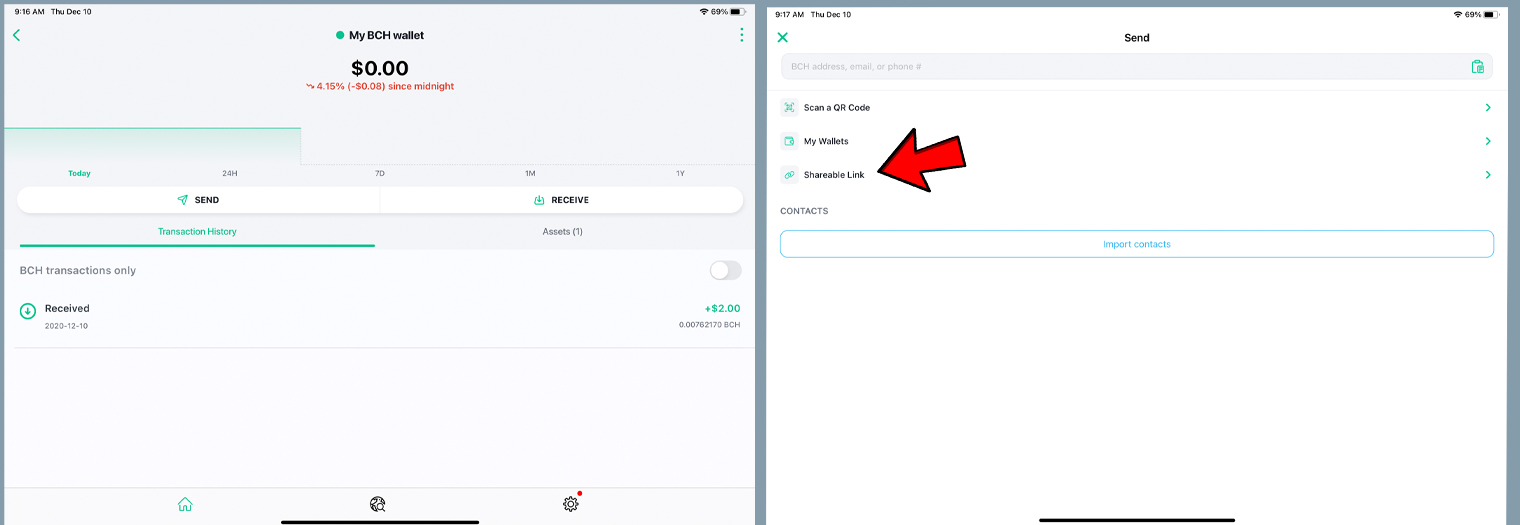
After depositing some funds into the BCH wallet, simply press “send” to create and send a shareable link. In addition to sending to any BCH wallet by scanning a QR code or sending to one of your own BCH wallets, the client offers a choice called: “shareable link.”
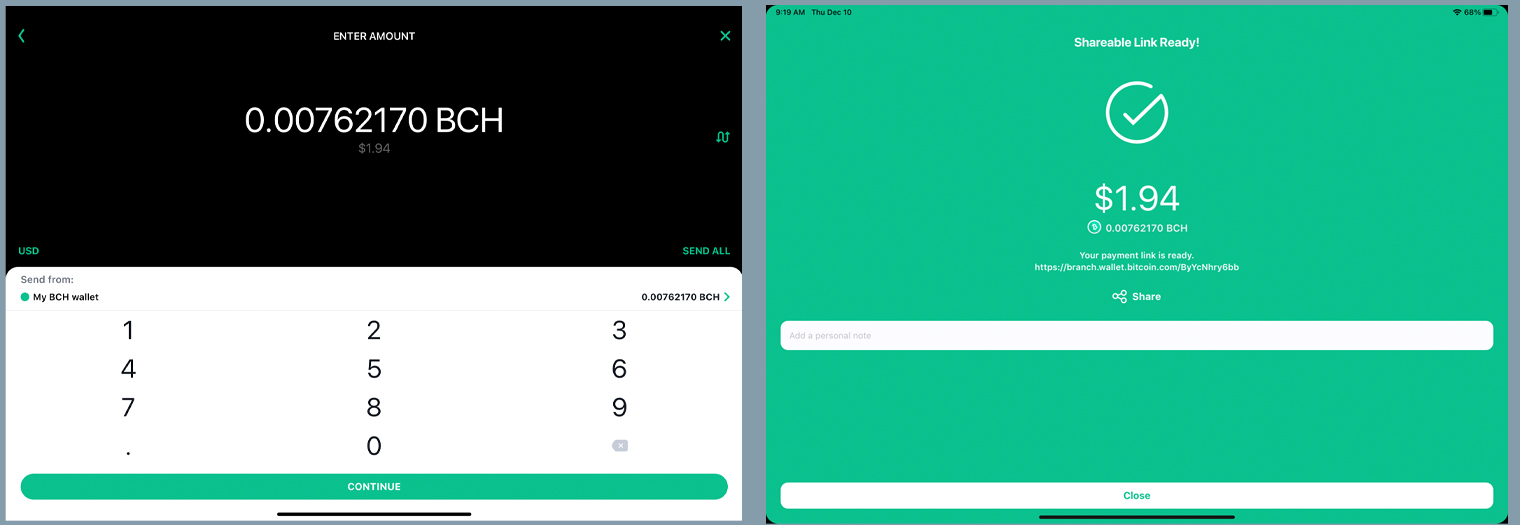
Following pressing the “shareable link” tab, the wallet directs you to the page where you enter the amount of bitcoin cash you want to send. With my test wallet containing $2 in bitcoin cash (BCH), I simply pressed “send all,” and pressed “continue” to finalize the transaction. After pressing “continue,” the Bitcoin.com Wallet will create a URL link with the bitcoin cash that can be sent using nearly any application on the web.
You can send the shareable link via text message, email, Twitter, Facebook, Whatsapp, Slack, Telegram, and basically anywhere you can share a link. Now, remember, you probably want to send the link privately, rather than sharing it in public, as anyone with access to the link can scan the funds.
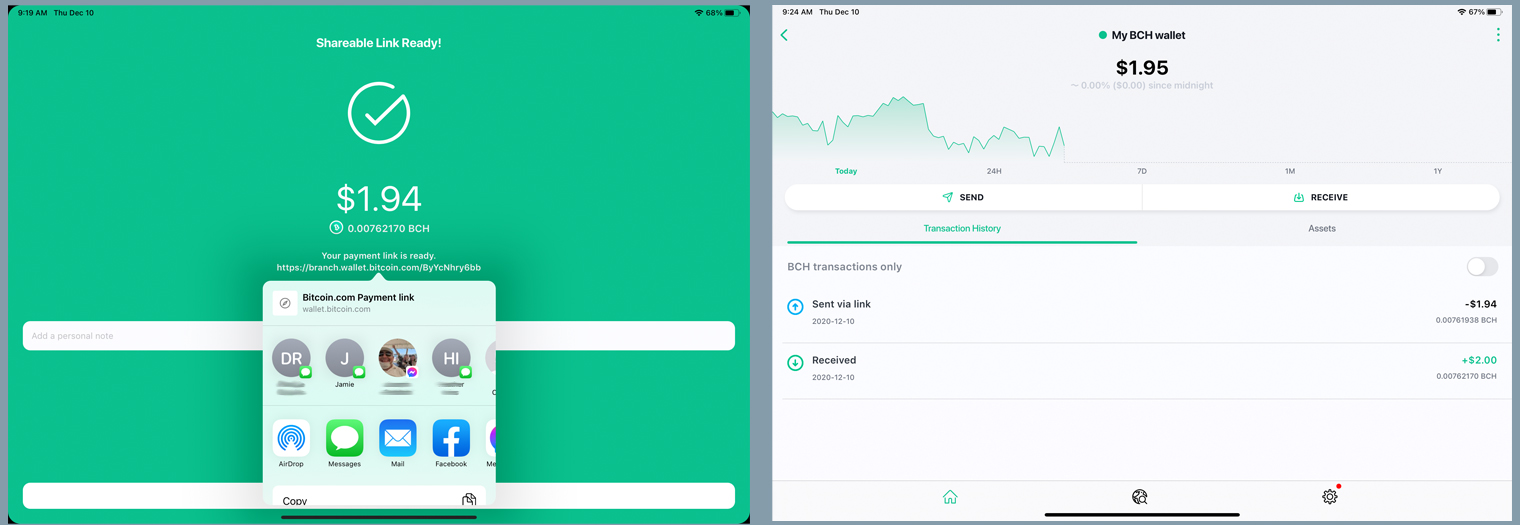
After the creation of my $2 BCH payment link, the Bitcoin.com Wallet gave me a choice to send it via a myriad of applications on my device. Since this was only a test, I sent the bitcoin cash to myself via SMS text message, and instantly received the shareable link.
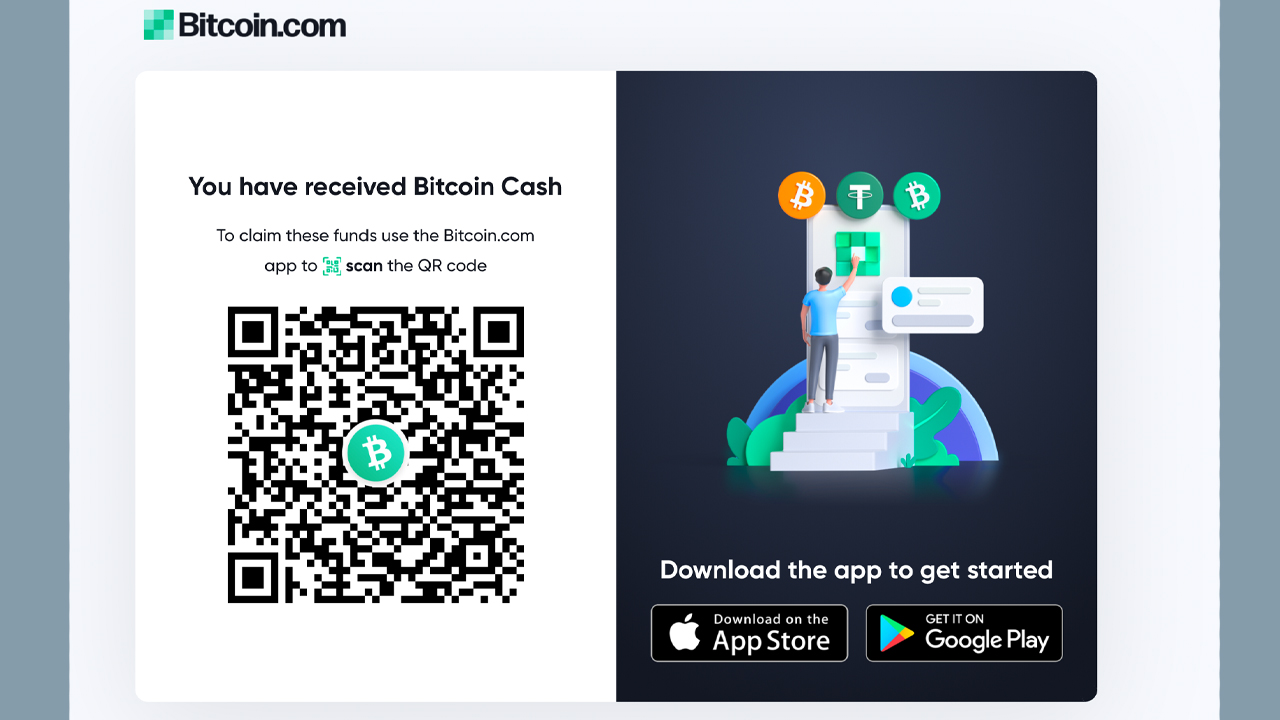
Opening up my Bitcoin.com Wallet version 6.10.3, I selected the little scan QR icon on the top right-hand side of the application, which is located next to the notifications bell icon. I simply scanned the payment link’s QR code, and my $2 worth of bitcoin cash (BCH) was instantly added to my wallet.
For More Info Click here -->>
Share:
twitter facebook linkedin redditYou MUST be logged in to like, dislike and comment on this post
Featured
cberry
16 Dec
9 0 $0.933312
cberry
03 Dec
50 0 $1.42
Trending
US needs to take leadership on central bank digital currencies: former CFTC chair
Brylant
03 May
1 0 $0
Will Elon Musk’s ‘SNL’ Appearance Send Dogecoin to the Moon? Curb Your Enthusiasm
Brylant
06 May
1 0 $0
Highest Earning
US needs to take leadership on central bank digital currencies: former CFTC chair
Brylant
03 May
1 0 $0
Will Elon Musk’s ‘SNL’ Appearance Send Dogecoin to the Moon? Curb Your Enthusiasm
Brylant
06 May
1 0 $0
US needs to take leadership on central bank digital currencies: former CFTC chair
Brylant
03 May
1 0 $0
Will Elon Musk’s ‘SNL’ Appearance Send Dogecoin to the Moon? Curb Your Enthusiasm
Brylant
06 May
1 0 $0
US needs to take leadership on central bank digital currencies: former CFTC chair
Brylant
03 May
1 0 $0
Will Elon Musk’s ‘SNL’ Appearance Send Dogecoin to the Moon? Curb Your Enthusiasm
Brylant
06 May
1 0 $0